




Off-the-Job Training
Off-the-Job Training: Your Guide to Recording It
What is Off-the-Job Training?
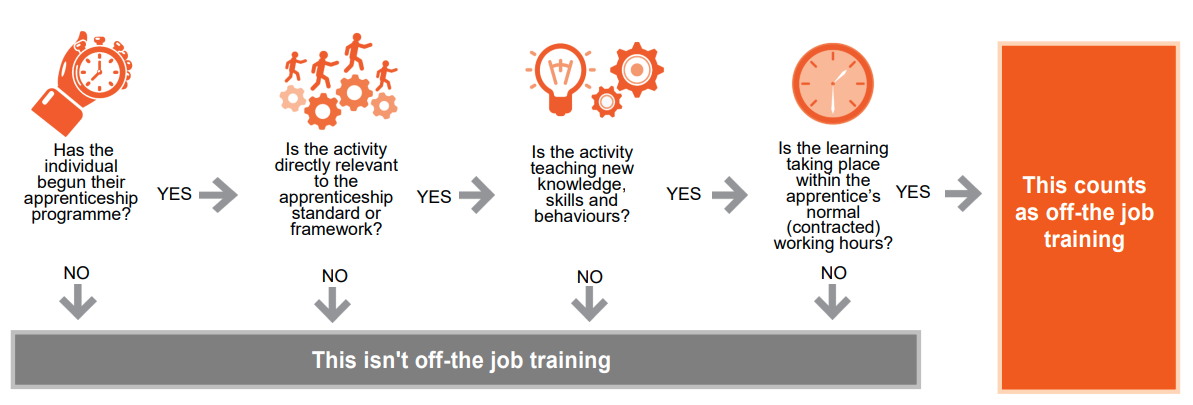
Off-the-job (OTJ) training is a statutory requirement for all English apprenticeships. It means new learning that takes place during your normal working hours (paid hours, excluding overtime) and is directly linked to the knowledge, skills, and behaviours (KSBs) in your apprenticeship standard.
It is not training that simply helps you do your day-to-day job—it must help you become fully competent in your role.
Why is OTJ Training Important?
- Builds your knowledge and skills step by step.
- Helps you prepare for your end-point assessment.
- Ensures you meet the minimum hours required for your apprenticeship.
- Adds value to your career and workplace.
What Counts as OTJ Training?
Activities that teach new knowledge, skills, and behaviours relevant to your apprenticeship standard, such as:
- Classroom or online learning (lectures, webinars, simulations).
- Practical training, shadowing, or mentoring.
- Industry visits or workshops.
- Time spent writing assignments or preparing for assessments.
- Learning support sessions (e.g., revision classes).
- Completing workbooks or tasks linked to your standard.
What Does NOT Count?
- Initial assessment or onboarding activities.
- English and maths qualifications (these are funded separately).
- Progress reviews or exams.
- Training outside normal working hours (unless agreed and time off in lieu is given).
- Travel time.
- Activities not linked to your apprenticeship standard.
How Much OTJ Training Do You Need?
- The minimum hours for your standard are published on the Institute for Apprenticeships website.
- Your provider will confirm your planned hours in your training plan.
- If you have prior learning, your hours may be reduced—but never below 187 hours or 8 months in duration.
What can be included in Off the Job Training?
Off-the-job training activities might include:
| 1. Learning theory/professional knowledge through: | 2. Practical training through: | 3. Learning support time spent on: |
|---|---|---|
|
|
|
What are the rules and what can’t be counted?
The apprenticeship funding rules state that off-the-job training does not include:
- Training to acquire knowledge, skills and behaviours that are not required in the standard or framework.
Example – You are completing a Business Administration level 3 Standard, and you complete a driving course. This is great for your personal achievements but would not be relevant to your standard, - Apprenticeship progress reviews or on-programme assessment required for an apprenticeship framework or standard.
- Training which takes place outside the apprentice’s normal working hours.
- English and maths (up to level 2) which is funded separately.
- Safeguarding activities – Such as the monthly safeguarding quiz.
Please ensure you complete a Learning Journal Entry in OneFile stating.
How to Record OTJ Training
You must evidence every OTJ activity in your learning journal (e.g., OneFile). Each entry should:
- Describe the activity (e.g., “Completed module on digital marketing analytics”).
- Link to your apprenticeship criteria (choose relevant KSBs).
- Reflect using the 3 I’s:
- Intent – What did you learn?
- Implementation – How will you apply it in your role?
- Impact – What difference will it make?
Recording Rules
- Log entries weekly at minimum.
- Each entry must not exceed 7.5 hours (450 minutes).
- If you spend more time (e.g., 10 hours on an assignment), split it into separate entries for different dates.
- Use meaningful titles and correct categories.
- Avoid duplicate entries or overlapping times.
Example OTJ Journal Entry
Time Spent: 3 hours (180 minutes)
Category: Online Learning
Linked Criteria:
- Knowledge: Understand principles of digital analytics and reporting.
- Skill: Ability to interpret data to inform marketing decisions.
- Intent: I learned how to use Google Analytics to track website traffic and measure campaign performance.
- Implementation: I will apply this by creating monthly reports for our marketing team and using insights to adjust campaigns.
-
Impact: This will improve decision-making and help optimise marketing spend, leading to better ROI for the business.
- Keep a notebook or digital diary to jot down activities during the week.
- Use your provider’s visual guidance in OneFile.
- Speak to your tutor if unsure what counts.
- Make time each week to update your journal.
- If you have a dedicated apprenticeship day, log everything you do that day.
- Completing online modules.
- Attending a workshop or webinar.
- Shadowing a colleague in a new process.
- Preparing for a professional discussion.
- Gathering evidence for your e-portfolio.
- Attending a relevant conference or industry event.
Off-the-job Training: Quick Guide for Apprentices
What makes an entry COMPLIANT?
Off-the-job training must:
- Take place during paid working hours
- Be learning, not normal job duties
- Link to apprenticeship knowledge, skills or behaviours (KSBs)
- Show what was learned and why it matters
NOT COMPLIANT – Missing Key Detail
Example: Incomplete evidence
- Activity: Attended a webinar on advanced Excel techniques and practiced creating pivot tables.
- Learning: Learned how to create pivot tables for data analysis (linked to Data Skills S2).
- Impact: I can now produce monthly reports faster, improving my efficiency.
What’s missing
- ❌ No confirmation of paid working hours
- ✔ Learning activity is relevant
- ✔ Learning and impact are clear
Why it doesn’t count
Without confirming the training happened during paid working time, it cannot be counted as off-the-job training.
NOT COMPLIANT – Normal Work Activity
Example: Daily job duties
- Activity: Worked on spreadsheet.
- Learning: Made some charts
- Impact: None. (This is just daily work, not new learning).
What’s included
-
❌ Normal work task
-
❌ No new learning
-
❌ No link to apprenticeship skills
-
❌ Impact confirms it is just daily work
Why it doesn’t count
Off-the-job training must be learning. Normal work tasks, even if useful, do not count.
COMPLIANT ENTRY
Example: Valid off-the-job training
- Activity: Attended a webinar on advanced Excel techniques and practiced creating pivot tables.
- Learning: Learned how to create pivot tables for data analysis (linked to Data Skills S2).
- Impact: I can now produce monthly reports faster, improving my efficiency.
What’s included
- ✔ Time recorded (9am–12pm)
- ✔ Learning activity (webinar + practice)
- ✔ Clear learning outcome
- ✔ Linked to apprenticeship skill (Data Skills S2)
- ✔ Impact explained
Why it counts
This is structured learning, done during paid hours, that builds new skills linked to the apprenticeship.
At-a-glance Comparison Table
| Entry Type | Paid Hour | Learning Activity | Linked to KSBs | Counts as Off-the-job? |
|---|---|---|---|---|
| Webinar 9am–12pm | ✔ Yes | ✔ Yes | ✔ Yes | ✔ Yes |
| Webinar (no time) | ❌ No | ✔ Yes | ✔ Yes | ❌ No |
| Daily spreadsheet work | ❌ No | ❌ No | ❌ No | ❌ No |
Remember
“Was I learning something new, during paid work time, that links to my apprenticeship?”